The tracker where tickets get done, not just tracked.
File a ticket the way you'd tell a colleague. One agent or a whole team of them, each on the AI model you chose, picks it up, does the work on its own computer and hands back a pull request or a finished result for your team to approve. Your board, your plan and your progress are the same thing.
Most trackers describe the work. This one does it.
A ticket in most tools is a note about work someone will do later. A ticket in JuhJuh is a job an agent can start now, with your team approving each step that matters.
On Monday a support lead filed a ticket: refunds over £500 should need a second approver. By Tuesday morning the agent had read the refund policy page, changed the rule, written the tests and opened a pull request. An engineer reviewed it in ten minutes and merged it.
WE PLAN JUHJUH WITH JUHJUH
Every change to this product starts as a ticket here.
This is what a week of tickets looks like when agents work beside the team.
A bug is reported in chatSomeone says "turn this into a ticket". It is filed from our template with every section filled, then analyzed and fixed before the next stand-up.
A feature is scopedThe ticket gets acceptance criteria as a checklist. The agent works through them one by one, and review checks the result against each line.
A cycle closesUnfinished tickets carry into the next cycle on their own. Goals update from what actually shipped, not from what was promised.
A ticket isn't codeA weekly report, a pricing page update or a customer reply. The agent hands back the finished artifact instead of a pull request.
THE TICKET IS THE UNIT OF WORK
A ticket is not a sticky note.
Everything about a piece of work lives on one page, from the first sentence of intent to the merged change.
Templates by ticket type, so every ticket starts with the right sections.
Acceptance criteria as a checklist the agent and the reviewer both work from.
Epics and subtasks, priority, story points, labels, a target date, watchers and dependencies that hold a ticket until its blockers finish.
Run by agents or by your team: switch any ticket either way.
A spec you can edit before any work starts, live terminals while it runs, then the change, inline review comments and the pull request.
Threaded comments with mentions, reactions and attachments, and a full history of every field change.
A link to the knowledge page it touched, so the fix is remembered.
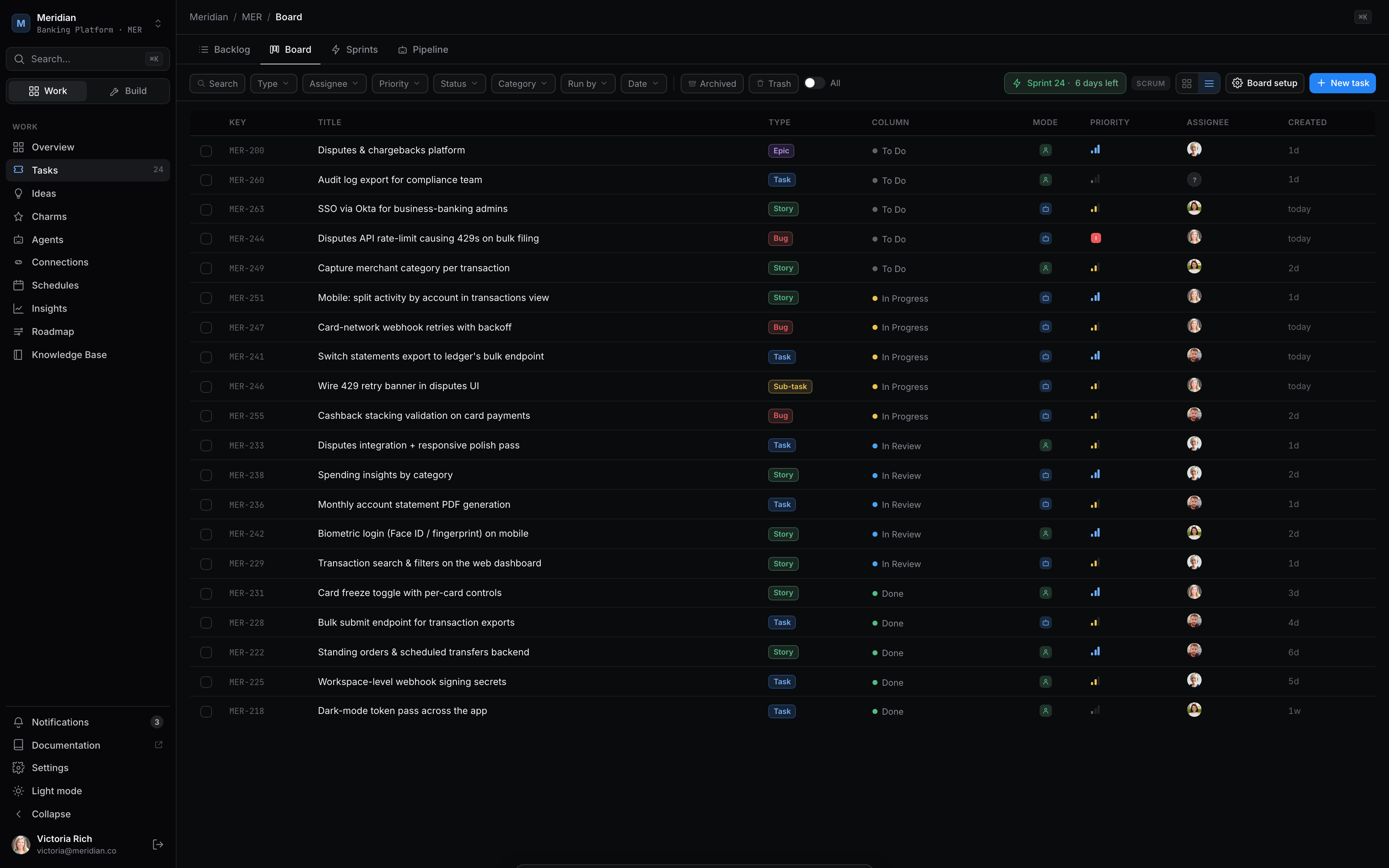
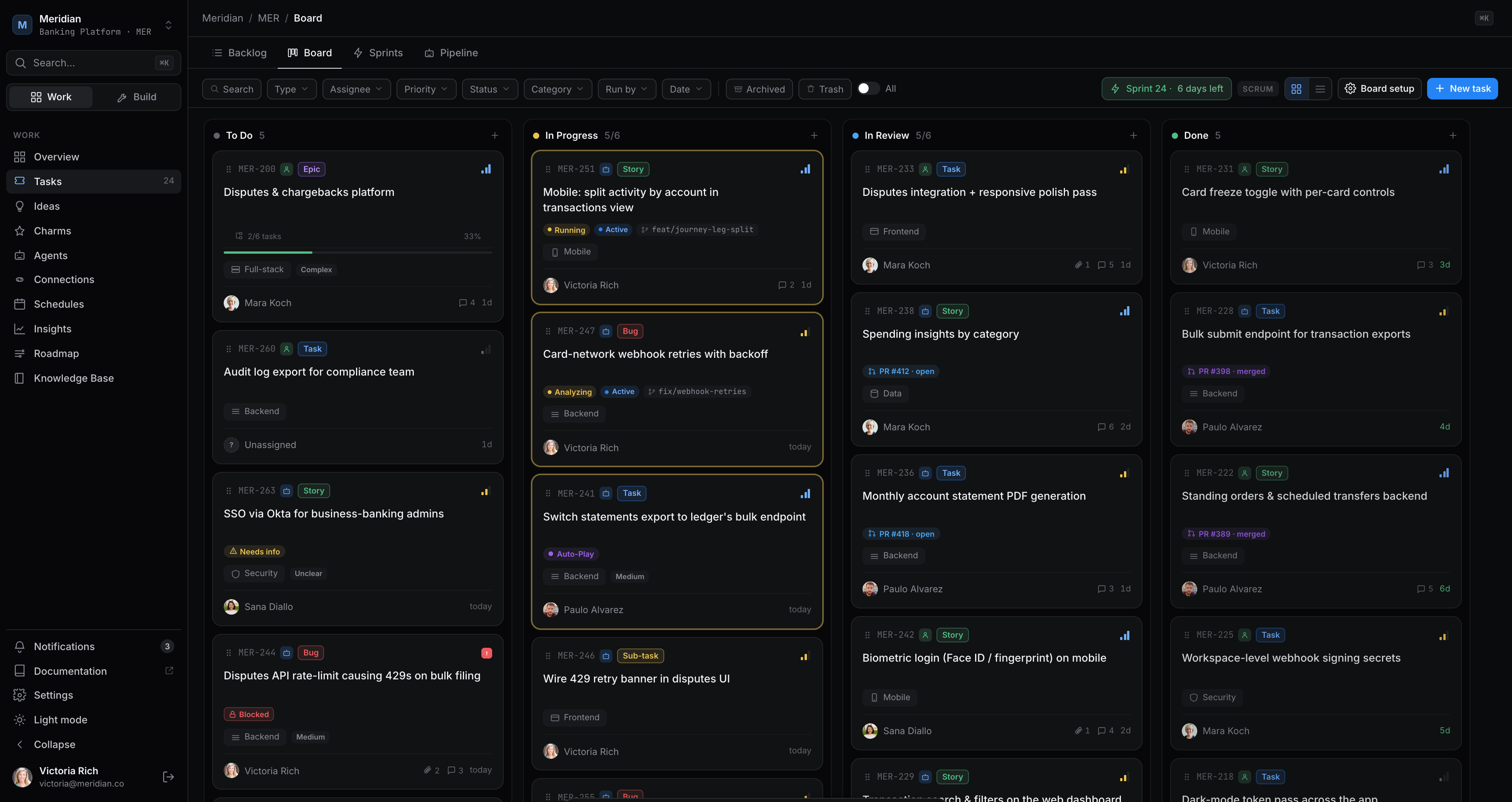
app.juhjuh.com/meridian/board
ONE PIPELINE, ONE NEXT ACTION
Ten stages from filed to finished. You're needed at two.
Every ticket moves through the same sequence, and the ticket page shows exactly one next action at each stage. Agents carry it from Queued to Review. You approve the change, then the pull request. The pipeline is verified before the ticket is marked deployed.
The board groups every ticket as To do, Working, Needs you, Done or Closed, so the column that matters to you is always "Needs you". A failed or partly finished run can be re-run from where it stopped, and a run that changed nothing closes as "No changes" instead of opening an empty pull request.
A SPECIALIST FOR EVERY STAGE · ANY MODEL
Every stage of every ticket has its own agent, on the model that suits it.
Your agents handle eight stages, from writing the ticket to summing up the result. Pick a specialist agent for each one. Each agent brings its own AI provider and intelligence level, so the planning model, the coding model and the reviewing model can all be different.
Ticket writing
Turns a rough request into a ticket set with every section filled.
claude · medium
Spec
Writes the product spec you can edit section by section.
claude · max
Analysis
Checks the finished spec against the ticket it came from.
gpt · high
Planning
Breaks the approved spec into the steps the build will follow.
claude · high
Implementation
Does the work in an isolated workspace, step by step.
gpt · high
Change review
Reviews the change with fresh eyes, on a different model from the one that wrote it.
claude · max
Pull request fixes
Reads review comments on the pull request and applies the fixes.
kimi · medium
Summary
Writes up what was done and how it went, for the team to read.
glm · low
The latest models, four levels
Anthropic, OpenAI, Google, Mistral, DeepSeek, Z.ai and Moonshot.
Low, medium, high or max intelligence, set per agent.
Spend the strongest model where it counts and a cheaper one on routine work.
Set once, change per ticket
The project sets an agent for each stage by default.
Any ticket can swap a stage's agent when it's created.
Every run records which agent and model did each stage, and what it cost.
Never stuck on one vendor
If a provider is down, the stage moves to the next one you allow.
Choose the regions your AI may run in. No model outside them is ever used.
Failover moves outward from your pick, cheaper side first.
Example setup shown. Jira and Linear connect to someone else's agent. Here, every stage is a specialist you chose, running on a model you chose.See how agents work
A TEAM ON EVERY TICKET
One ticket, a whole team of agents. Each one on its own model.
Every ticket has a team board. Put as many different agents on it as the job needs, each from the provider you chose for it, and they run in order: an advisor before anything starts, a domain expert on every step, a pair partner alongside, a reviewer after each step and a final audit at the end.
Mix agents from Anthropic, OpenAI, Google, Mistral, DeepSeek, Z.ai and Moonshot on the same ticket, so one model's blind spot is another's catch.
Give an agent a condition, like "only frontend steps" or "only steps that change code", and it runs only when that's true.
Put several agents in one slot and set the order they run in.
Choose whether an agent's output feeds the next step.
Attach agents to a repository and every ticket on it gets them, locked in place.
Before the work
Prepare before work: runs once before anything starts, like a pre-flight advisor.
Prepare before each step: runs before every step.
During the work
Domain expert: frontend, backend, test or content expertise, added to every step it matches.
Executor: the agent that does the ticket itself.
Pair programming: works alongside the run; its findings are merged in at the end.
After the work
Review each step: checks the work after every step, as it happens.
Final audit: runs once after all the work is done.
YOUR RULES, YOUR VOICE, YOUR DESIGN
Every build follows your house style. Nothing random reaches review.
Write your rules once, at the level they belong to. Every run of every ticket gets them all, together with your brand voice and your design system, so the agents work the way your company works.
Your brand voice, plus each person's own writing voice, goes into every run.
Interface work is built against your design system's tokens and components.
Ticket templates per project and per ticket type, or install them from the template catalog.
Project defaults for practices and for the agent on each stage, which any ticket can change.
Agents attached to a repository come with every ticket on it, and can't be removed from the ticket.
1 · Organization
The rules every team and every project follows.
2 · Project
How this product is built, tested and shipped.
3 · Team
Your team's conventions, applied when one of its members owns the ticket.
4 · Codebase
The instructions file already in your repository.
5 · You
Your own preferences, added last, on every ticket you own.
ENGINEERING PRACTICES, BUILT IN
The habits of your best engineers, on every ticket.
Tick the practices a ticket should follow, or set them once as the project's default. The agents plan, build and prove the work that way, and the practices lock once the spec is approved, so nobody quietly drops them halfway through.
Test-driven development
Failing tests are written first, then the code that makes them pass, using your repo's own test framework.
pytestjestvitest
Behavior-driven development
Scenarios in plain language come first, then the tests, then the build. Turn on both and you get all three, in that order.
cucumberpytest-bdd
Visual proof
For frontend work, the agent runs the app and attaches a screenshot, or a screenshot and a short screen recording.
screenshotvideo
Peer review between agents
A second agent reviews the change in a fresh context, on a different model from the one that wrote it.
fresh contextsecond model
Pair programming
A pair agent works alongside the run and its findings are merged in at the end. You can pair too: edit the spec, watch live, comment on any line.
pair agentinline comments
Acceptance criteria, verified
The checklist on the ticket goes to the agent and comes back ticked, line by line, before review.
checklist
Branch per ticket
Every ticket is built on its own isolated branch. Main is never touched until a person merges.
isolated branch
CI before done
Tests run on the agents' own computer with built-in CI, and the pipeline is verified before a ticket counts as deployed.
verifying pipeline
PLAN · GROOM · SHIP
Plan the way your team thinks. Watch it get done.
Six views of the same tickets. Groom the backlog, pull work into a cycle, and read the roadmap to see how the quarter holds together.
Board
Your own columns or a table, with WIP limits that warn before work piles up, and swimlanes by goal.
Backlog
Prioritize, then pull a ticket into the next cycle with a drag.
Cycles
An optional cadence that carries unfinished work forward on its own.
Goals
Progress and health roll up from the tickets underneath, so outcomes are measured by shipped work.
Roadmap
A timeline across projects that knows what blocks what, with a burn-up and a public page if you want one.
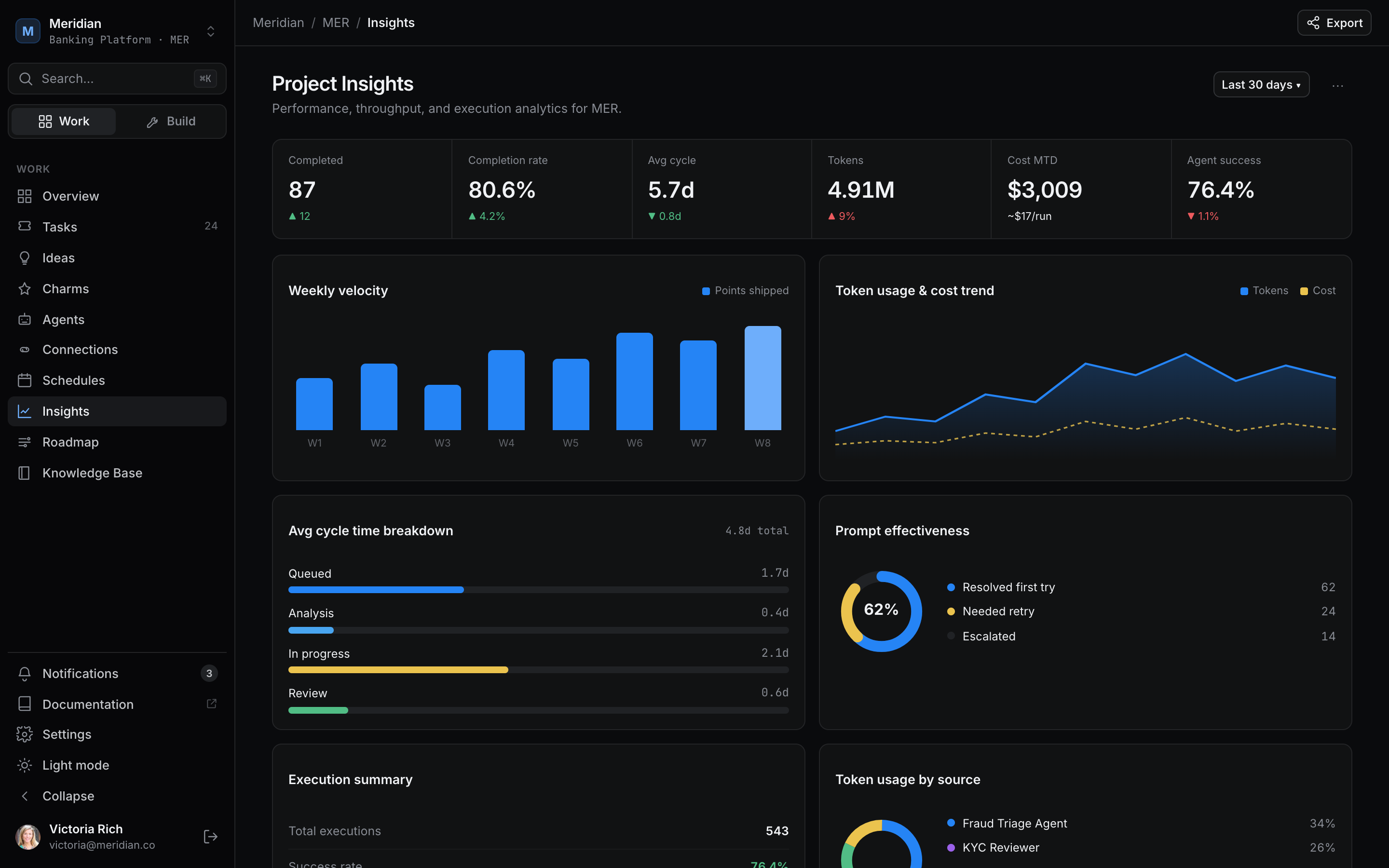
Insights
Throughput, cycle time, run success rate and AI cost, for the team and the agents.
app.juhjuh.com/meridian/insights
PLAN AND PROGRESS, ONE THING
A plan you can defend, because the work is already moving.
When agents do the volume, the plan stops being a guess. Every ticket records how long it took, who worked on it and what it cost, so the next quarter starts from real numbers.
A dependency graph shows the order of work, so it's never a guess.
Goals show live progress from their tickets, with health marked On track, At risk or Off track.
See what each ticket's AI work cost, and pay only for the intelligence it needed.
NOT JUST ENGINEERING
Every team files tickets. Every team gets them done.
Code is where most teams start. A ticket can ask for anything an agent can do, so the whole company plans in one place.
Engineering
Bugs, features and refactors come back as reviewed pull requests.
pull request
Support
Escalations become tickets with the customer's history attached, and come back as a drafted reply.
reply draft
Marketing
Launch posts, page updates and decks, written in your brand voice.
articledeck
Finance
Reconciliations and reports, with every mismatch linked to its source record.
report
Operations
Recurring checks and vendor follow-ups, filed on a schedule and closed by an agent.
checklist
Product
File the intent and the acceptance criteria. Read the result on the same ticket.
spec
AGENT-NATIVE, NOT AGENT-ONLY
Built for agents. Just as good for the work your people do.
Every ticket is run either by agents or by your team, and you can switch it either way until its pull request is open. A human ticket is a complete, traditional ticket. It just never waits on an agent.
Everything a tracker should do
An assignee, a reporter, watchers and an owning team.
Story points, priority, labels, a target date, epics and subtasks.
Comments, mentions, attachments and a full change history.
One board for both
Human and agent tickets share the same board, backlog, cycles and goals.
Insights show what your team shipped next to what the agents shipped.
Saved views, filters and search work across all of them.
Move at your own pace
Start with every ticket run by your team, and hand one over when you're ready.
Take a ticket back from the agents and finish it yourself.
Keep Jira or Linear as the record while work happens here.
AGENTS ON THE TICKET
Assign it to a person, an agent, or both.
Agents are teammates on the board, not a bot posting comments. They analyze the ticket, plan the work, do it on their own computer and stop for review.
Each job runs in its own isolated workspace, never on a staff laptop.
Big tickets are split into a plan and handed to specialist agents.
Agents read your knowledge base first and write back what they learned.
If a run fails, the agent tries the fix first, then tells the right person.
Engineer · MER-412meridian/payments · second approver on refunds over £500
Running
AnalyzingRunningReviewPR Created
FILED FROM ANYWHERE
Tickets start where the conversation already is.
Nobody has to stop and fill in a form. Ask for it where you are, and the ticket arrives on the board with the right template.
From chat
Say "file this" in a channel or a DM and the agent writes the ticket from the thread.
chatassistant
From Slack and Teams
Requests land in an intake queue where you accept, defer, merge or reject them.
slackteams
From Jira or Linear
Keep the tracker your company lives in. Jira syncs both ways; Linear issues sync in and their status is written back.
jiralinear
From a meeting or your voice
Turn a meeting into tickets, dictate one, or paste a page of notes and get it split up.
meetingsvoice
Before you file, possible duplicates are shown and AI suggests the type, priority and labels for you to accept. Recurring tickets file themselves on a schedule. The ticket, the thread it came from and the knowledge it used stay linked.See integrations
SAFETY
Agents do the volume. Your team keeps the judgment.
Nothing an agent produces reaches a customer or your main branch without a person saying yes.
Review
Code ships as a pull request for a human to review.
Review checks the work against every acceptance criterion.
Nothing merges or publishes on its own.
Permissions
Viewers can read tickets; only people allowed to run them can start an agent.
Agents can do only what the person behind them is allowed to do.
Guests get no agent powers.
Record
Every state change is logged with who made it and why.
Every run keeps its output, so you can see what the agent did.
Every AI call is billed to the workspace that asked for it.
See how JuhJuh compares with Jira and Linear across 11 capabilities.
Jira and Linear are strong trackers, and both now connect to AI agents. JuhJuh puts the agents, the chat, the knowledge base and the computers they work on in the same place as the tickets.
Swipe the table to see every product.
How JuhJuh tasks compare with Jira and Linear
Capability
JuhJuh
Jira
Linear
Agents that do the ticket, not just read it
Analyze, spec, build, test and open the pull request on their own computer
Rovo and connected coding agents work from issues
AI agents from connected tools work from issues
A chosen specialist agent and model for every stage
Eight stages, each with its own agent, provider and intelligence level
Not published
Not published
Many different agents on one ticket, before, beside and after every step
Before all, before each, pair, review each step and final audit, with conditions
Not published
Not published
TDD, BDD and visual proof as ticket settings
Tick a practice and the agents plan, test and prove the work that way
Not published
Not published
One fixed pipeline with a person at the right two stages
Ten stages; you approve the change, then the pull request
Workflows you design per project
Workflow states you set per team
Organization, project, team, repository and personal rules in every run
All five layers, with your brand voice and design system
Not published
Not published
Traditional tickets for work people do
Run by agents or by your team; switch either way
Issues for every team
Issues for product teams
Board, backlog, cycles, goals, roadmap and insights
All six, on the same tickets
Boards, backlog, sprints and timeline
Issues, cycles, projects and initiatives
Team chat with agents as members
Channels, DMs and threads; file a ticket from any message
Connects to Slack and Teams
Asks turns workplace requests into issues
A knowledge base agents read and write
Built in; agents read it first and write back what they learned
Confluence, a separate product
Not published
AI cost on every ticket
Each ticket shows what its AI work cost
Not published
Not published
Based on each company's public announcements and documentation as of October 2026. "Not published" means we could not find a public statement either way. Products change quickly; tell us if something here is out of date.
File a ticket. Watch it get done.
Import your backlog, connect one repository, and hand the first ticket to an agent.
Your plan and your progress, finally the same thing. That's the juju.
JuhJuh uses cookies
We use essential cookies to run the site, and optional analytics
cookies to count visitors. We set no advertising or marketing cookies.
Only essential cookies are turned on by default.
Cookie Policy
Essential
Required for the site to function
Analytics
A first-party visitor ID, so we can count returning visitors. Not shared with anyone.
Hey there!
We typically reply in minutes
Have questions about JuhJuh or want to see how it fits your team? We'd love to chat.