Automation
Automate your workflow with AI-powered classification, triage, and execution. Configure auto-play rules and let the platform learn from your patterns.
JuhJuh does not wait for you to classify, triage, or execute manually. The platform handles orchestration automatically, from the moment a ticket lands to the pull request that closes it.
Your team focuses on the decisions that matter. JuhJuh handles everything between.
Auto-classification
When a ticket arrives, whether synced from an external tracker or created directly in JuhJuh, the platform immediately classifies it across four dimensions:
- Execution mode: Codebase, Refactor, Standalone, Research, Review, Config, or Unclear
- Ticket type: Backend, Frontend, Full-Stack, DevOps, Documentation, and 20+ other specialized types
- Deliverable type: code change, document, standalone script, or media asset
- Confidence scoring: each classification carries a 0-to-1 confidence score so you know how certain the decision is
Every classification runs through a structured scoring pipeline. The classifier analyzes titles and descriptions separately, scoring each against codebase and standalone patterns. Title scores carry double weight because titles tend to be more precise than descriptions.
When the signal is ambiguous, JuhJuh does not guess. Tickets below 0.55 confidence or with conflicting signals between title and description automatically escalate to Unclear for human review. You see exactly why the classifier flagged it, so your decision takes seconds rather than minutes.
Auto-triage
Beyond classification, JuhJuh suggests operational metadata for every new ticket:
- Priority level: Highest through Lowest, based on scope and impact signals
- Story point estimate: Fibonacci scale, calibrated against your project's historical patterns
- Expert team assignment: which domain specialists should handle the ticket
- Affected file predictions: the files most likely to change during execution
Auto-triaged fields are visually marked so you always know what was suggested versus what was manually set. Override any suggestion with a click. JuhJuh learns from your corrections over time.
Auto-play
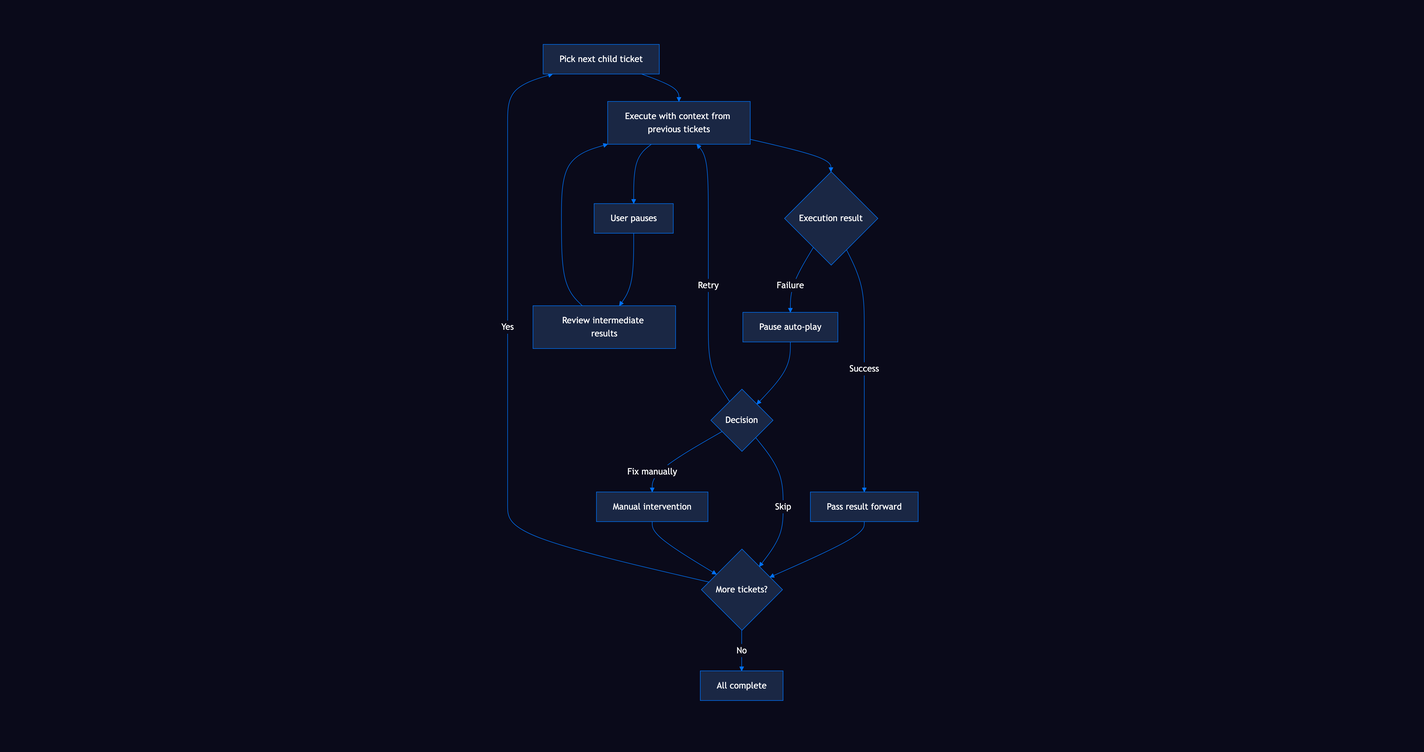
Auto-play is sequential execution of child tickets under an Epic or Story. Start it from a parent ticket, and JuhJuh takes over:
- Picks the next child ticket in priority order
- Executes it with full context from previous completions
- Passes the result forward so the second ticket knows exactly what the first one changed
- Continues until all children are complete or you pause
Each ticket still passes through all five safety gates during auto-play. The speed comes from removing wait time between tickets, not from skipping validation.
Stop at any point to review intermediate results. Resume when you are satisfied. If a ticket fails, auto-play pauses and surfaces the failure so you can decide how to proceed: retry, skip, or fix manually.
Continuous knowledge learning
Every execution teaches JuhJuh something. The knowledge base is not static. It updates continuously as your team works.
- Successful patterns: when an execution succeeds, the pages it referenced get a confidence boost
- Failure signals: failed executions flag potentially outdated knowledge for review
- Stale detection: pages past their verification interval surface automatically for your team to refresh
- Usage tracking: see which knowledge pages contribute most to successful outcomes
- Confidence decay: unused pages gradually lose confidence. The active knowledge base stays fresh and accurate.
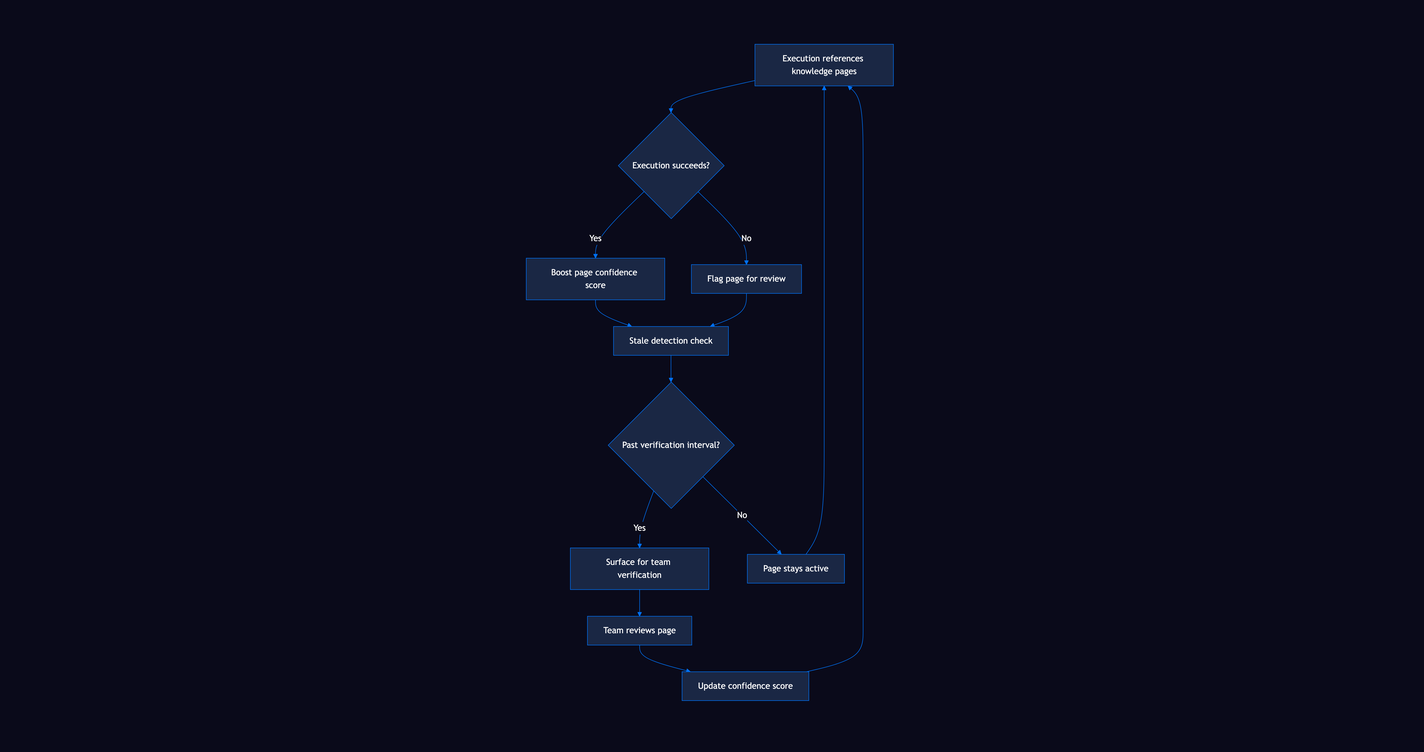
Your team writes documentation. JuhJuh reads it, uses it, and measures whether it helps. Pages that consistently lead to good executions rise to the top. Pages that mislead get flagged for revision.
The result is a feedback loop. Your documentation goes from static reference to living system. The more your team documents, the better JuhJuh executes. The better JuhJuh executes, the more your team documents.
Execution tracking
Every automated action is fully observable. Nothing happens in a black box:
- Real-time logs: watch execution output as it happens, streamed live to your browser
- Token consumption: see cost per ticket, per project, and per time period
- Duration and file changes: see exactly how long each execution took and what it touched
- Retry tracking: up to 10 automatic retries on transient failures, each attempt logged
- Full audit trail: what happened, when, and what triggered it
Execution history is searchable and filterable. Review any past execution to see what JuhJuh did, which knowledge pages it referenced, and how long each step took.
What stays manual
Not everything is automated. That is by design. JuhJuh draws a clear line between orchestration and decision-making.
- Diff review: you review every code change before it moves forward
- PR approval: your team approves pull requests, not the AI
- Unclear escalation: ambiguous tickets wait for human judgment before execution begins
- Pipeline gates: CI/CD must pass before anything merges
JuhJuh automates the orchestration. Your team owns the decisions. That's the juju.
Related
- Tickets: where execution happens and results are tracked
- Pages: the knowledge base that powers continuous learning
- Core Concepts: safety gates and the ticket lifecycle
- Integrations: connect external trackers for auto-classification
- Agents: attach specialized agents to the execution pipeline
- Slack: receive notifications and triage intake requests from Slack