Tickets
Create, classify, and execute development tickets with AI. Auto-triage issues, generate code from ticket descriptions, and track progress in real time.
Tickets are the unit of work in JuhJuh. Each ticket represents a specific change your codebase needs. You create or sync a ticket, JuhJuh classifies it, AI agents write the code, and you review a clean diff before anything merges.
Creating tickets
Tickets enter JuhJuh from several sources.
Manual creation. Click New Ticket inside any project. Give it a clear title and description. Specificity matters: "Add pagination to the users API endpoint" produces sharper results than "fix users page."
External tracker sync. Connect Jira, Linear, or GitHub Issues via your integrations. JuhJuh pulls tickets directly into your project. Synced tickets stay linked, and status updates flow both ways.
Idea capture. Rough ideas and feature requests convert into structured tickets. JuhJuh expands them into a PRD and generates tickets automatically.
Tip: Tickets with a focused title and a description that explains the "why" consistently produce better executions. Include acceptance criteria when you can.
Ticket lifecycle
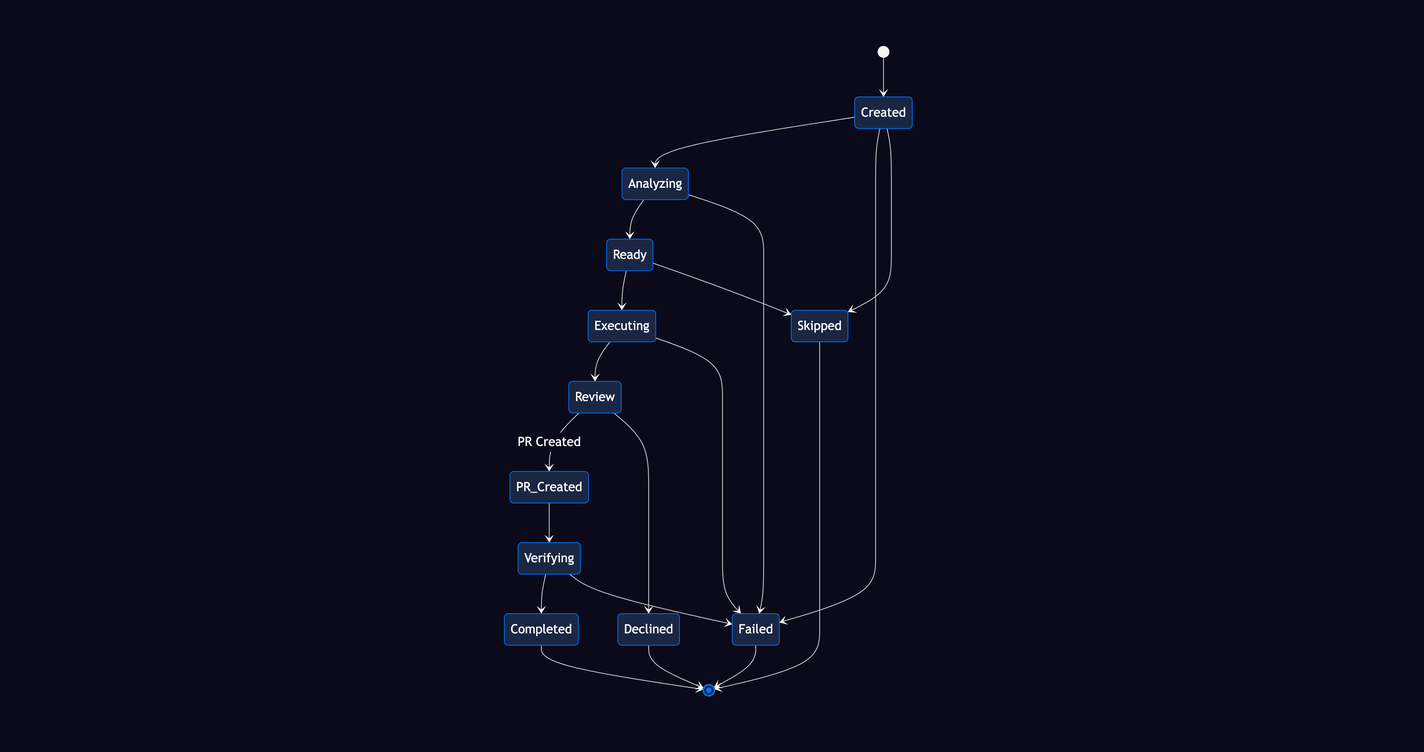
Every ticket moves through a defined sequence of statuses. Here is the full path from creation to deployment.
1. Created or synced
The ticket exists in your project. It has a title, description, and optional metadata like priority or labels.
2. Analyzing
JuhJuh auto-classifies the ticket's complexity, identifies which files are likely affected, and assigns an execution type. This step determines how the ticket will be handled.
3. Ready
Analysis is complete. The ticket is queued for an available runner.
4. Executing
AI agents write code in an isolated branch. No changes touch your main branch during this phase. The execution tracks every file modified, tokens consumed, and time elapsed.
5. Review
Changes are ready for your team to inspect. You get a full diff view with line-by-line additions, deletions, and modifications across every affected file.
6. PR created
JuhJuh opens a pull request in your connected VCS. The PR includes the diff, a summary of what changed, and a link back to the original ticket.
7. Verifying
Your CI/CD pipeline runs against the PR. Test results, linting output, and build status are tracked alongside the ticket.
8. Completed or deployed
The PR is merged and live. The ticket closes automatically.
Terminal states
Not every ticket reaches completion. Failed means the execution hit an unrecoverable error. Skipped means the ticket was deprioritized or superseded. Declined means a reviewer rejected the changes. Each terminal state preserves the full execution history for reference.
Ticket types
JuhJuh categorizes tickets by domain so the right context and prompt templates apply during execution.
| Group | Types |
|---|---|
| Engineering | Backend, Frontend, Full-Stack, DevOps, Testing, Security, API, Mobile, Infrastructure |
| Product and design | Design, UX Research, Accessibility |
| Content | Documentation, SEO, Marketing |
| Business | Operations, Support, Research |
Types are assigned during analysis and influence which prompt template, context sources, and review criteria JuhJuh uses.
Execution modes
During analysis, JuhJuh auto-classifies each ticket into an execution mode that determines how work proceeds.
- Codebase. Modifies existing repository code. The most common mode for feature work, bug fixes, and improvements.
- Refactor. Restructures code without changing external behavior. JuhJuh applies stricter diff validation to prevent breaking changes.
- Standalone. Produces scripts, documents, or reports that do not belong to an existing repo.
- Research. Investigation and analysis. Outputs a structured report rather than code changes.
- Review. Code review and feedback on existing PRs or branches.
- Config. Configuration-only changes like environment variables, CI pipelines, or build settings.
- Unclear. JuhJuh cannot confidently classify the ticket. It escalates automatically for human clarification before proceeding.
Priority and story points
Every ticket carries a priority and a complexity estimate.
Priority ranges from Highest through High, Medium, Low, to Lowest. Auto-triaging suggests a priority based on the ticket's title, description, and type. You can override it at any time.
Story points use a Fibonacci scale: 1, 2, 3, 5, 8, 13, and 21. Points reflect estimated complexity, not hours. A 1-point ticket is a trivial change. A 21-point ticket is a large, multi-file restructuring. JuhJuh suggests points during analysis, and your team can adjust them.
Workflow modes
Each ticket runs in one of two workflow modes.
AI workflow. JuhJuh executes the ticket automatically. Analysis, code generation, PR creation, and status updates all happen without manual intervention. This is the default for most tickets.
Human workflow. The ticket is tracked on your board, but no AI execution runs. Use this for work that requires manual implementation: hardware changes, vendor negotiations, or tasks outside JuhJuh's scope.
What happens during execution
When a ticket enters the executing phase, JuhJuh follows a structured pipeline.
- Prompt selection. JuhJuh picks the right prompt template based on the ticket's type, execution mode, and project configuration.
- Context gathering. Relevant code, documentation, and knowledge entries are assembled into the execution context. This includes file contents, project conventions, and any linked tickets.
- Isolated execution. AI agents work in a dedicated branch. Your main branch is never modified during execution.
- Commit and diff. Changes are committed with a full diff summary. Every file added, modified, or deleted is tracked.
- Execution telemetry. JuhJuh records tokens used, execution cost, duration, files modified, and the prompt template version. Your team gets full visibility into what happened and what it cost.
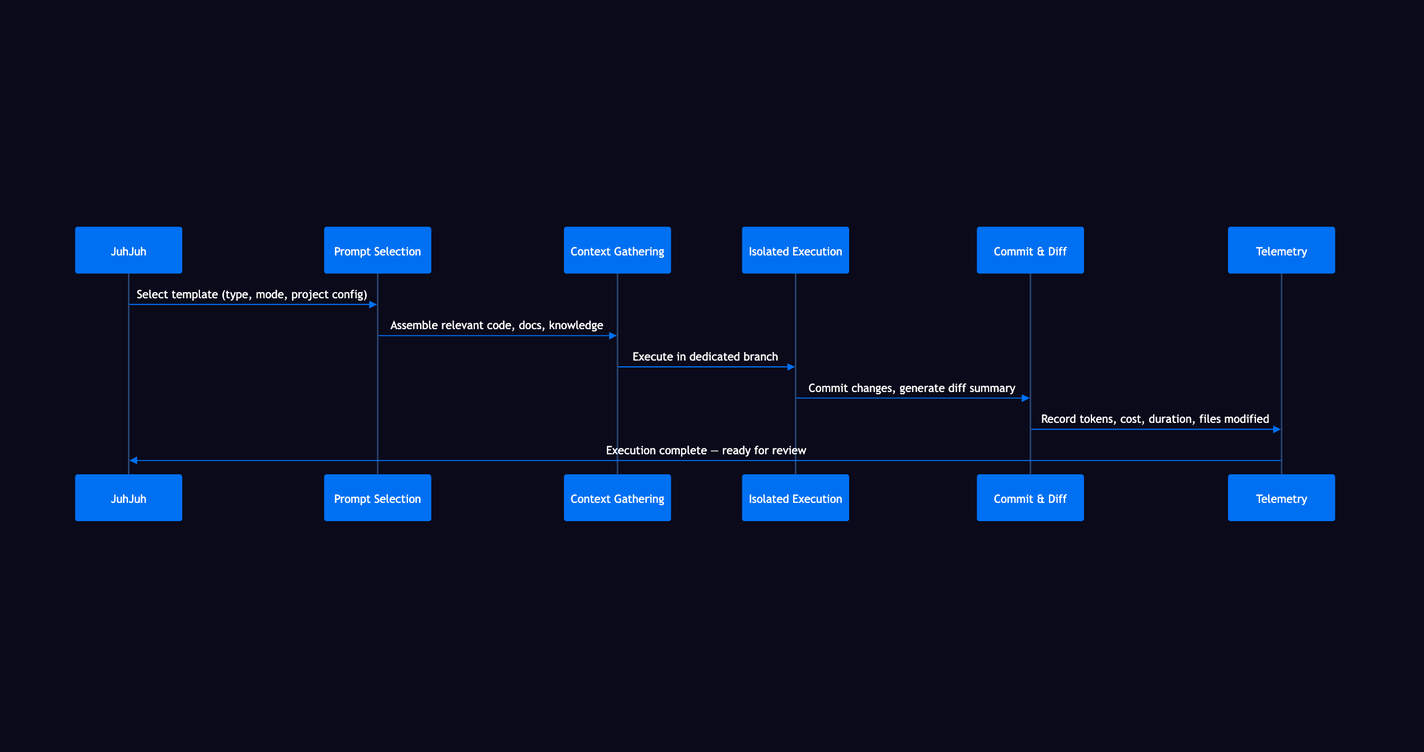
The result is a clean, reviewable set of changes tied to a single ticket. Your team approves or requests revisions.
Related
- Boards, visualize and move tickets through your workflow
- Projects, the home for your tickets, repos, and configuration
- Prompt Templates, control how AI generates code for each ticket type
- Automation, auto-classification, triaging, and pipeline triggers
- Agents, the AI runners that execute your tickets
- Ideas, capture and expand rough concepts into structured tickets with AI
- Core Concepts, safety gates, execution model, and platform fundamentals
- Ticket Templates, standardize ticket fields, naming, and validation across your organization