Boards
Visualize work with kanban and scrum boards. Plan sprints, track velocity, and let AI surface bottlenecks across your development workflow.
Every project gets a board. Choose Kanban for continuous flow or Scrum for sprint-based delivery. You see exactly where every ticket stands, and you move work forward by dragging it.
Board setup
When you create a project, JuhJuh provisions a board automatically. One project, one board, zero configuration required to start.
From the board settings you can:
- Choose your methodology. Kanban for steady, continuous delivery. Scrum for time-boxed sprints.
- Customize columns to mirror the stages your team actually uses.
- Switch methodologies at any time without losing ticket history.
Pick the approach that matches how your team ships. You can always change it later.
Columns
Columns represent the stages a ticket moves through on its way to done. Each column maps to one or more ticket statuses, so dragging a ticket between columns updates its status automatically.
- Drag to reorder. Set the position of each column to match your workflow's natural sequence.
- Set WIP limits (Kanban). Cap how many tickets can sit in a column at once. Bottlenecks surface before they slow the team down.
- Mark a start column. The column where active work begins. Used for cycle-time tracking.
- Mark a done column. The column where work is considered complete. Closes the cycle-time clock.
- Set a default column. New tickets entering the board land here automatically.
A clear column structure keeps the board honest. If a column is overloaded, your process is telling you something.
Working with tickets on the board
The board is where tickets move through your workflow. Every interaction keeps you in flow.
- Drag and drop tickets between columns to advance them through your workflow.
- Click any ticket to open its details inline. No page navigation, no lost context.
- Switch workflow mode. Toggle between AI execution and human workflow on a per-ticket basis.
- Assign story points with the Fibonacci scale (1, 2, 3, 5, 8, 13, 21) to size effort consistently.
- Bulk actions. Select multiple tickets to move, assign, or update them in one operation.
- Backlog management. Send tickets to the backlog when they are not ready, or activate them when priorities shift.
Sprints (Scrum)
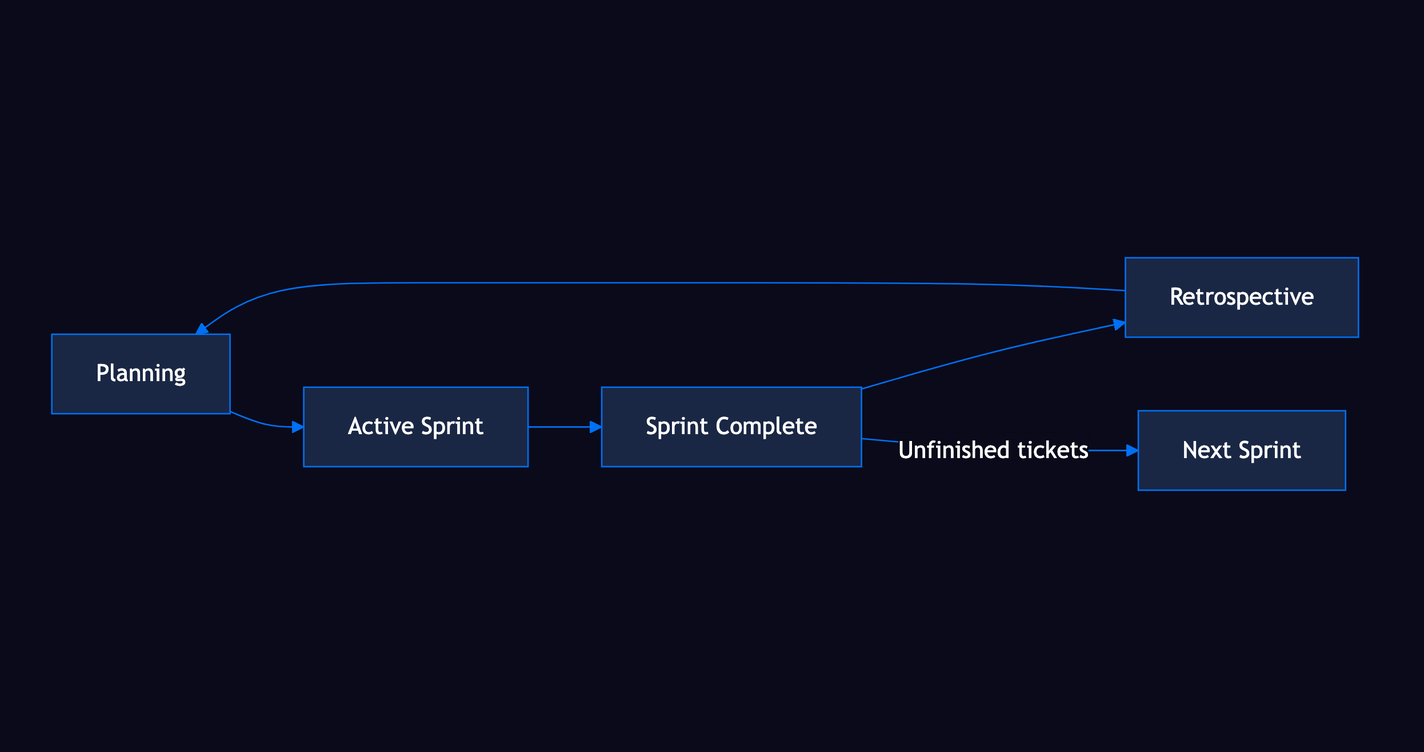
Sprints give your team a fixed timebox to deliver a set of tickets. JuhJuh tracks the full sprint lifecycle from planning to retrospective.
Planning a sprint
- Create a sprint with a clear goal, start date, and end date.
- Pull tickets from the backlog into the sprint during planning.
- Story points give you a capacity target based on your team's historical velocity.
During the sprint
- The board shows only tickets in the active sprint.
- Track progress with a burndown chart that plots remaining story points against time.
- Add tickets mid-sprint if priorities change. The burndown adjusts automatically.
Completing a sprint
- Mark the sprint as complete when the timebox ends.
- Unfinished tickets move to the next sprint automatically. Nothing falls through the cracks.
- Add retrospective notes to capture what worked, what did not, and what to improve.
Velocity tracking
Velocity measures how much your team delivers per sprint, expressed in story points completed.
- Sprint velocity. Story points completed in each sprint, displayed as a trend line across your sprint history.
- Burndown charts. Remaining work plotted against time for the active sprint. Shows whether you are on pace.
- Forecasting. Use your average velocity to predict how many sprints a backlog will take to clear.
Velocity is a planning tool, not a performance metric. Use it to set realistic sprint goals and spot trends early.
Kanban-specific features
Kanban boards optimize for continuous flow rather than fixed timeboxes. The goal is steady throughput with minimal work-in-progress.
- WIP limits per column. Restrict how many tickets can occupy any stage at once. When a column hits its limit, the team finishes existing work before pulling new tickets in. This prevents context switching and keeps cycle times predictable.
- Continuous flow. No sprint boundaries. Tickets enter the board when ready and flow through columns at their own pace.
- Cycle time metrics. Measure elapsed time from the start column to the done column for every ticket. Shorter cycle times mean faster delivery. Track averages and outliers to find where work gets stuck.
Choosing between Kanban and Scrum
| Kanban | Scrum | |
|---|---|---|
| Cadence | Continuous | Fixed sprints |
| Planning | Pull when ready | Sprint planning sessions |
| Metrics | Cycle time, throughput | Velocity, burndown |
| Best for | Support, maintenance, steady streams | Feature development, predictable delivery |
Both methodologies share the same board infrastructure. Columns, ticket details, drag-and-drop, and story points work identically in either mode. The difference is how you batch and measure the work.