Virtual Machines
Provision and manage virtual machines directly from JuhJuh. Configure specs, monitor status, and give AI agents isolated execution environments.
VMs are cloud-provisioned virtual machines where your services run. JuhJuh provisions each one through a guided wizard and manages the full lifecycle from a single dashboard.
Navigate to VMs
- Open your organization
- Click PaaS in the sidebar
The PaaS dashboard shows all active VMs with their status, specs, IP address, and latest deployment version.
Create a VM
JuhJuh uses a five-step wizard to provision a new VM.
Step 1: Environment type and name
- Click Create VM on the PaaS dashboard
- Select an environment type:
| Type | Purpose |
|---|---|
| Production | Live, user-facing |
| Staging | Pre-production testing |
| UAT | User acceptance testing |
| Development | Active development |
| Preview | Branch previews |
| Sandbox | Experimentation |
- Enter an environment name. Lowercase letters, numbers, and hyphens only; 2 to 63 characters
Step 2: Select repository
- Choose a code repository from your connected resources
- JuhJuh uses this to determine the container configuration and image to deploy
Step 3: Vault configuration
- Configure environment variables for this VM
- Add key-value pairs manually, or let JuhJuh auto-detect variables from your Compose file
- Mark sensitive values as Secret. They are encrypted at rest
- Mark required variables to enforce completeness before deployment
Step 4: Compute configuration
- Select a region from 30+ locations across Europe, North America, Asia Pacific, Middle East, and South America
- Choose CPU: 1, 2, 4, or 8 cores
- Choose RAM: 1 to 32 GB
- Choose Storage: 10 to 500 GB
- Estimated monthly cost updates live as you configure
Step 5: Review and create
- Review all choices: environment, repository, vault entries, compute specs, and estimated cost
- Click Create to provision
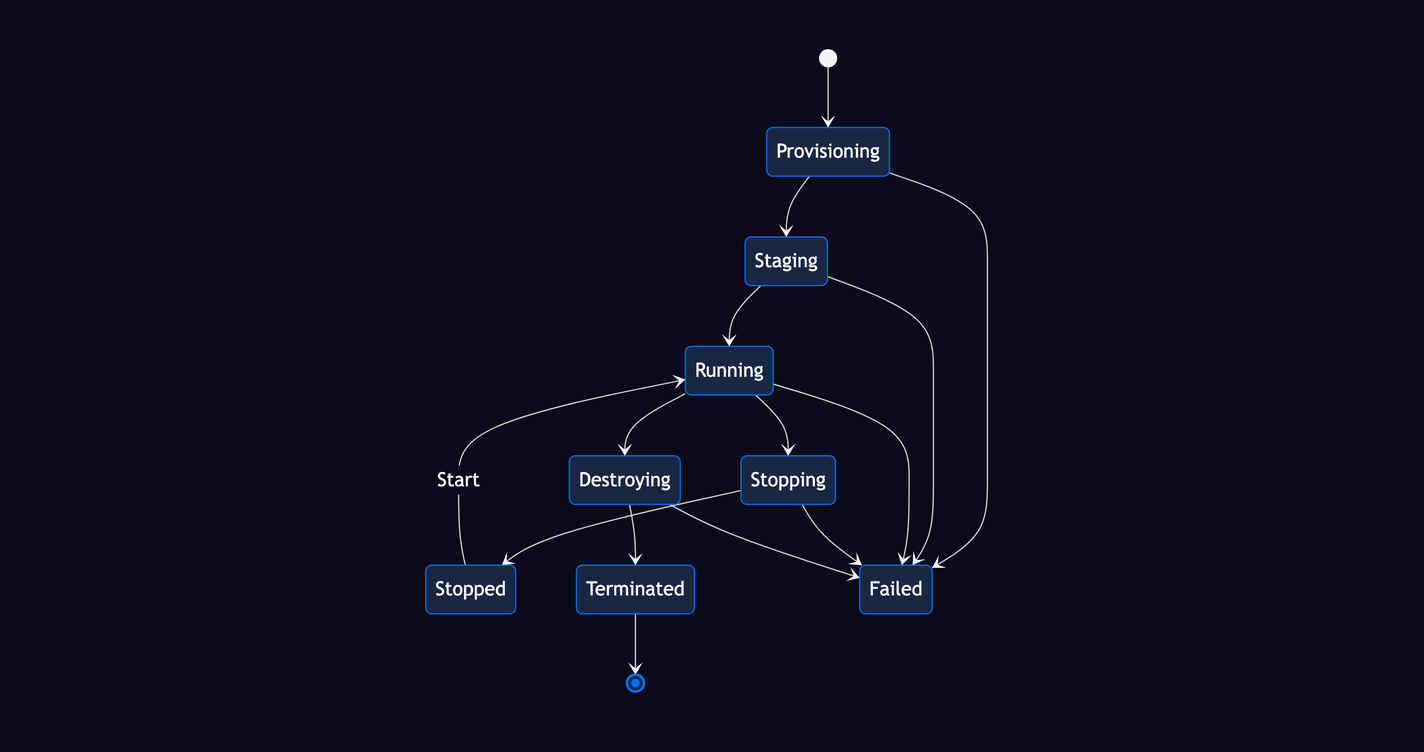
JuhJuh reserves a static IP, sets up secure access, and provisions the VM. The dashboard updates in real time as the VM moves through Provisioning, then Staging, then Running.
VM lifecycle
| Action | What it does | How |
|---|---|---|
| Start | Boot a stopped VM | Click Start on the instance card |
| Stop | Gracefully shut down a running VM | Click Stop on the instance card |
| Destroy | Permanently delete the VM and release its IP | Click Destroy, then confirm |
All lifecycle actions run in the background. The dashboard updates live via real-time push.
Status reference
| Status | Meaning |
|---|---|
| Provisioning | VM is being created |
| Staging | VM is booting and running setup scripts |
| Running | VM is online and accepting connections |
| Stopping | Shutdown in progress |
| Stopped | VM is offline but preserved |
| Destroying | Teardown in progress |
| Terminated | VM has been permanently deleted |
| Failed | Provisioning or lifecycle action failed |
Config-as-code VMs
You can also define VMs in your JuhJuh File instead of using the dashboard wizard:
vms:
  production-app:
    name: my-app-prod
    env_type: production
    cpu: 4
    memory_gb: 16
    disk_gb: 200
    region: europe-west
Run juhjuh apply to provision VMs from the file. They appear on the PaaS dashboard alongside wizard-created VMs and follow the same lifecycle. See the JuhJuh File VMs section for the full reference.
Private networking
All VMs in your organization are connected through a private network. Your services can reach each other using internal IP addresses without any extra configuration. If your API server needs to talk to your database VM, it can connect directly over the private network. See Networking for firewall rules, exposed ports, and deployment references.
Cost management
VMs are billed hourly while running. Stopped VMs still incur charges for reserved IPs and disk storage. To control costs:
- Configure auto-stop to shut down idle VMs after a set number of days
- Choose a reserved commitment (1-year or 3-year) for predictable pricing on long-running VMs
- Monitor spending with cost alerts in the billing dashboard
What each VM includes
Every VM is ready to run your services out of the box:
- A dedicated static IP address
- A private IP address for internal communication with other VMs in your organization
- Secure access managed entirely by JuhJuh, with no key management on your end
- Container runtime pre-installed and configured
- Vault secrets automatically injected at deploy time. Your application picks them up as environment variables with no manual wiring
- Optional custom deploy command for non-standard setups
Related
- Resources: connect the repositories and registries your VMs pull from
- Vault: manage the environment variables and secrets injected into each VM
- Networking: private networks, firewall rules, and service discovery between VMs
- Deployments: ship container images to your running VMs
- Infrastructure Overview: see how VMs fit into the full infrastructure stack
- Billing: understand VM costs, metering, and reserved commitments
- Observability: automatic infrastructure metrics and log collection for your VMs
- CLI: create, start, stop, and destroy VMs from your terminal