Projects
Organize repositories into projects, configure integrations with GitHub and Bitbucket, and manage team access controls across your codebase.
A project in JuhJuh maps to a code repository. It is where tickets, prompt templates, instructions, and integrations come together. Every action your team takes (writing code, running pipelines, reviewing diffs) happens within a project.
Creating a project
The creation wizard walks you through five steps.
1. Choose a project type
Pick the category that matches your work: Software Development, Marketing, Data & Analytics, Documentation, or another option. This determines what features and templates JuhJuh turns on by default.
2. Select a category
Categories control whether a code repository is required.
Code categories require a connected repository: - Monolithic. Single codebase, single deployment. - Microservices. Multiple independent services. - Multi-Repo. Related code spread across several repositories. - Single-Repo. One repository, one project.
Non-code categories skip the repository step entirely: - Task-Tracking-Only. Pure ticket management. - Campaign. Marketing and content coordination. - Documentation-Only. Docs, wikis, and knowledge bases.
3. Connect your repository
Link a repository from Bitbucket, GitHub, or GitLab via your integrations. JuhJuh syncs branches, pull requests, and commit history so tickets stay connected to the actual code.
4. Configure branch settings
Set your default branch, define branch naming conventions, and configure protection rules. These rules determine where JuhJuh creates working branches and which branches require review before merging.
5. Set lint and format commands
Tell JuhJuh which commands to run for linting and formatting (e.g., make lint, make format). These run automatically during execution to keep generated code consistent with your standards.
Project resources
Resources are external integrations connected to a specific project. Each project manages its own set of connections.
| Resource type | Examples |
|---|---|
| Code repositories | Bitbucket, GitHub, GitLab. Full VCS sync with branches and pull requests. |
| Issue trackers | Jira, Linear, GitHub Issues, GitLab Issues. Two-way ticket sync. |
| CI/CD pipelines | GitHub Actions, GitLab CI, Bitbucket Pipelines. Build status and logs. |
| Communication | Slack, Discord, Teams. Notifications and status updates. |
| Documentation | Confluence, Notion. Linked knowledge bases. |
| Infrastructure | Kubernetes, Container Registry. Deployment targets. |
Add resources from the project settings page. Each resource stores its own credentials and configuration.
Team members and roles
Every project inherits your organization's member list. You can assign project-specific roles to control access.
| Role | Permissions |
|---|---|
| Owner | Full control: billing, destructive actions, member management |
| Admin | Manage members, settings, and integrations |
| Member | Create and execute tickets, edit prompt templates |
| Viewer | Read-only access to all project data |
Roles are cumulative. An Admin has all Member permissions. An Owner has all Admin permissions.
Instructions
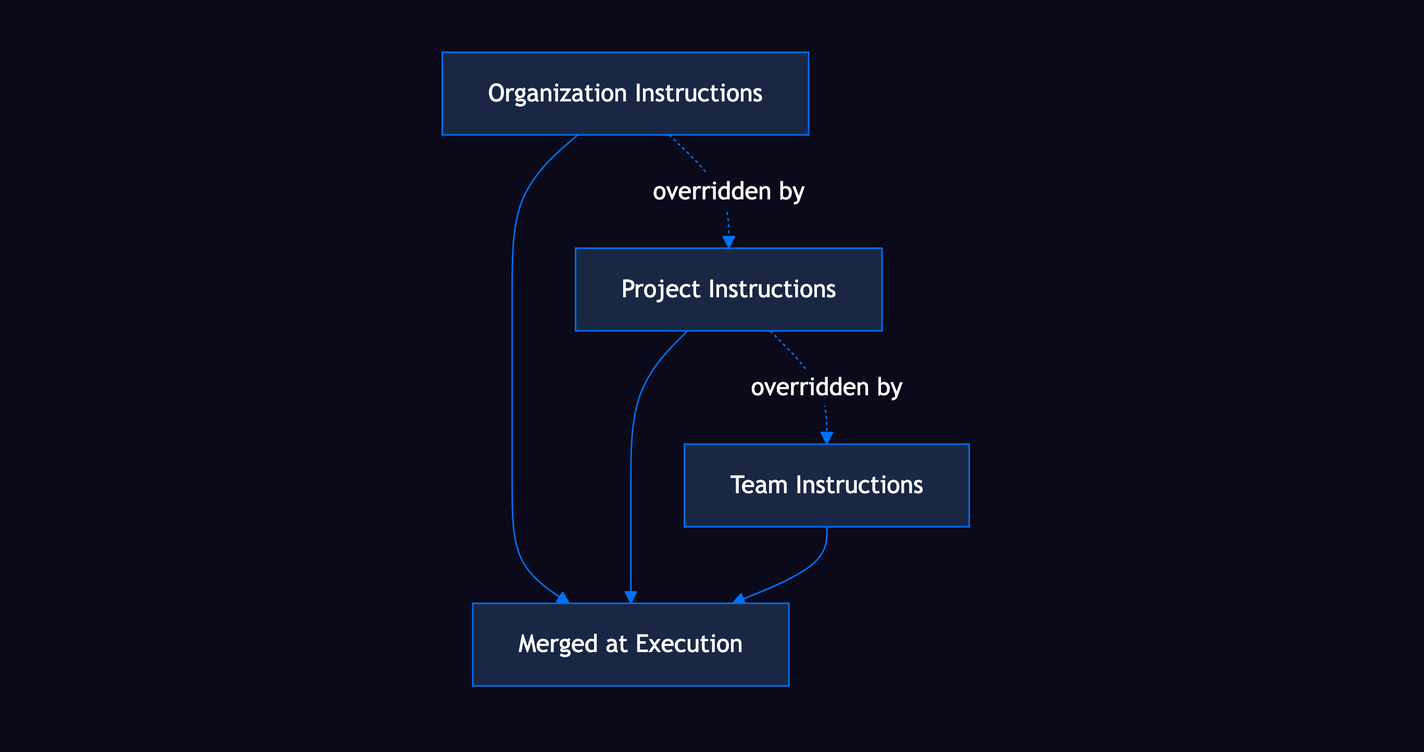
Instructions tell JuhJuh how to write code for your project. They follow a cascade where more specific levels override general ones.
- Organization-level. Global standards that apply to every project. Set coding conventions, security policies, and style rules here.
- Project-level. Repo-specific conventions like framework patterns, file structure rules, and naming standards.
- Team-level. Squad preferences for a subset of your team. Useful when different teams own different parts of the codebase.
When JuhJuh executes a ticket, it merges instructions from all three levels. If a project instruction conflicts with an organization instruction, the project instruction wins. Team-level instructions override both.
Service dependencies
Projects can declare relationships with other projects in your organization. JuhJuh uses these relationships to understand how your systems connect.
| Dependency type | What it means |
|---|---|
| API Consumer/Provider | One project calls another project's API |
| Message Queue | Projects communicate through async message queues |
| Event Stream | One project subscribes to events published by another |
| Library | One project depends on a shared library project |
| Gateway | A project routes traffic to downstream services |
Declaring dependencies gives JuhJuh context when generating code. If your project consumes an API from another project, JuhJuh can reference that project's contracts and types.
Project configuration
Fine-tune how JuhJuh interacts with your project from the settings page.
Execution controls - Turn AI execution on or off per project - Set lint and format commands that run during every execution
Appearance - Upload a project avatar - Choose an icon and color theme for the sidebar and dashboard cards
Classification - Set an industry tag: IoT, FinTech, Healthcare, E-Commerce, SaaS, and others - Industry classification informs which domain-appropriate patterns and compliance rules JuhJuh applies
All configuration changes take effect immediately. Running executions use the settings that were active when they started.
Related
- Tickets, the unit of work inside a project
- Boards, visualize and manage ticket flow with Kanban or Scrum
- Resources, external services connected to your project
- Integrations, connect repositories, issue trackers, and CI/CD
- Prompt Templates, control how AI agents generate code
- Instructions: set coding standards and conventions
- Slack, create tickets and trigger agents from Slack channels